

Auto repair shop software
Seal the job. Change it, and it shows.
Shop management software for independent auto repair, tire, diesel and fleet shops. Repair orders (ROs), estimates, digital vehicle inspections, the register and the time clock. Seal a finished job and nobody can change it without it showing. Not your staff, not you, not us.
The demo shop is free, with no sign-up. It is sample data: nothing you do there reaches a real customer.
The board
16 stages, from Intake to Picked Up. Needs More Parts and Waiting on Approval are stages, because jobs go backward. Every move records who made it.

Bay 01
What it costs
One price per shop. No fee per login.
One person. One location.
As many people as you have. One location.
Two locations or more, reported together.
Every plan does the whole daily job. Pay yearly and you pay for ten months. Ask for a refund within 30 days of your first payment and you get all of it.
Bay 02
One repair order, six steps
Write it up
Customer, vehicle, VIN and what the customer says is wrong. The repair order records who wrote it up.
Put it on the board
Every move from one stage to the next records who made it.
Inspect it
Digital vehicle inspection. A courtesy multi-point, a diagnosis or a deep diagnostic, each its own sheet. A truck is also asked about its DEF, and a medium or heavy truck about its air brakes. Findings and photos land on the estimate.
Send the estimate
The customer answers Yes, do it or Not now on each line, and signs.
Invoice it, get paid
The invoice comes from the job. Record cash, check or card, or send a link to pay by card on your own Stripe account.
Seal it
When the car is picked up, the job is frozen, fingerprinted with SHA-256 and signed. It names the tech who did the work and who sealed it.
Meanwhile, the customer
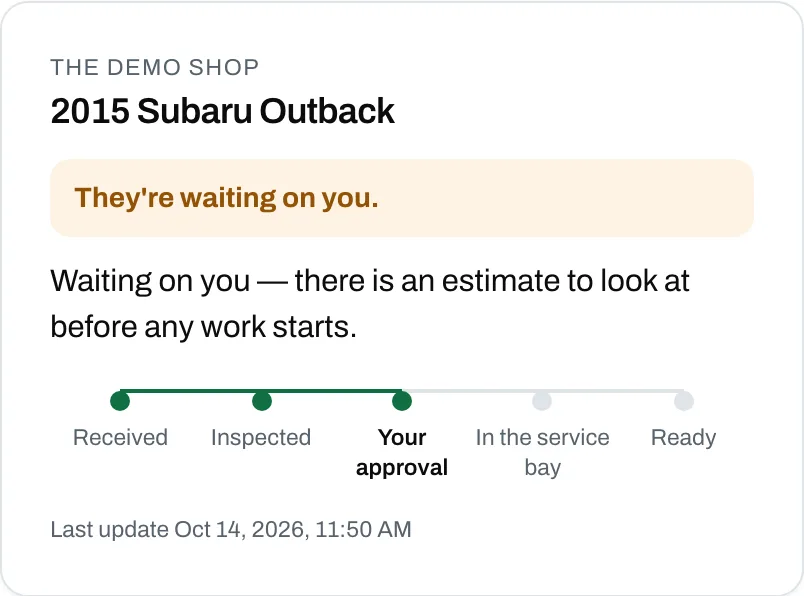
Where’s my car?
Give out your shop code. A customer looks up their repair with the phone number you have on file and the last six of the VIN, and sees where it stands. No account, no password, no phone call to you.
Bay 03
The sealed record
- FreezeThe complaint, the diagnosis, every labor line and part, the vehicle, the tech and who sealed it.
- FingerprintSHA-256. Change one character and the fingerprint stops matching.
- SignAn Ed25519 key kept outside the database signs it.
- ChainEach record is linked to the one before it, so a gap shows.
Tamper-evident, not tamper-proof. Sealing does not stop a change. It makes one show.

A sealed repair can go onto the vehicle’s permanent record, once, with your shop’s name on it. Never your prices, your costs or your vendors. Never anything about the customer.
Bay 04
Your kind of shop
Auto repair and diesel jobs each get their own sign-off checklist.
Bay 05
Switching from your old shop software
Comes across
Customers, vehicles and past repairs, from CSV files.
Stays behind
Photos, open jobs, payments, messages, appointments and hours.
You do the import, on Shop and Group, at no extra charge. Solo starts from your first job.
Bay 06
Who built it
I run a repair shop. This is the software we use to run it.
That is why parts of it look strange until you have stood at a counter. The profit figure goes blank instead of guessing, because a margin built on a cost nobody entered is worse than no margin at all. And a job finished on somebody's driveway says Finished, not Picked up, because nobody picked anything up.
None of that came out of a product plan. It came off the counter.
I use this every day. When something in it is wrong, it is wrong for me first.
Bay 07
Not built yet
Read this before you buy.
- Not builtLive parts lookupVendor catalogs (PartsTech, WORLDPAC, Nexpart) are partner-gated and we do not have that access. You type parts off the counter receipt and the app remembers them.
- Not builtAdding a Group location yourselfBuying Group sets up all your locations. A location added later, we join to your group for you.
- Not builtLabor-guide timesWe do not sell book time. Name your guide and type its hours onto the line.
If any of that decides it for you, wait. Everything else on this page works today.
Bay 08
Questions shops ask
What is Scarab OS?
Shop management software for independent auto repair, tire, diesel and fleet shops: repair orders, estimates, digital inspections, invoices and the time clock, with every finished job sealed.
Is there shop software for diesel and fleet shops, not just cars?
Yes. The VIN picks the labor rate by weight class, trucks get their own inspection points, and a fleet customer keeps every vehicle under one name with its own history.
Can anyone change a job after it's finished?
Not without it showing. A sealed job is frozen, fingerprinted and signed. Money owed back afterwards is a refund or a credit, as its own entry.
Can I try it before I buy?
Yes. The demo shop is a working copy with three months of sample data, and nothing you do there reaches a real customer.
Can I bring my records over from my old software?
On Shop and Group, yes: customers, vehicles and past repairs come across from CSV files, at no extra charge. Solo starts from your first job.

See it on a job
The demo shop is a working copy with three months of sample data. Run a repair from intake to the seal.